2026-01-230
ai概念学习
对于程序员来说,掌握ai相关的知识是现在以及未来必须具备的能力,所以先要掌握ai的相关概念
什么是token :
token是大模型处理文本的基本单元
- 简单来说,模型并不直接阅读“单词”或“句子”,而是将输入的文本切割成一个个片段,这些片段就是 Token。
什么是agent
Agent = LLM(大模型)+ Planning(规划)+ Memory(记忆)+ Tools(工具)
RAG
发音为软安哥
- 概念:Retrieval-Augmented Generation(检索增强生成)
- 什么是RAG:
- 一种结合 检索(Retrieval) 和 生成(Generation) 的自然语言处理技术。
- 先从知识库或文档库中检索相关信息,再基于这些信息生成回答或文本。
- 解决纯生成模型可能“凭空编造”(hallucination)问题,提高回答准确度。
- 解决什么问题
- 用来解决:模型不知道 / 不准 / 不能瞎编
skills
- 概念:可以理解为工具说明书
- 更偏向语义层,通常包括:
- 一个能力能做什么(例如:总结、翻译、写代码)
- 什么时候用它
- 输入/输出格式
- 使用示例
- 有时还包括提示词模板(prompt template)
- 更偏向语义层,通常包括:
MCP
Model Context Protocol 模型上下文协议
- 概念:一个统一的通用协议,给 AI 接工具的“统一插头”
- 工具怎么描述
- 参数怎么传
- 返回结果怎么给模型
- MCP 是标准,Skill 是具体工具
- mcp server :真正提供能力(查数据库、读文件、调 API)
- mcp client :是调用这些工具的通道或者ai
- mcp 协议: 让两者能标准化通信的规则
mcp 的核心能力
大白话就是mcp能干吗
- tools
- resources
- prompt
大白话总结: mcp 能够使用工具,能够访问资源,能够提供prompt模板
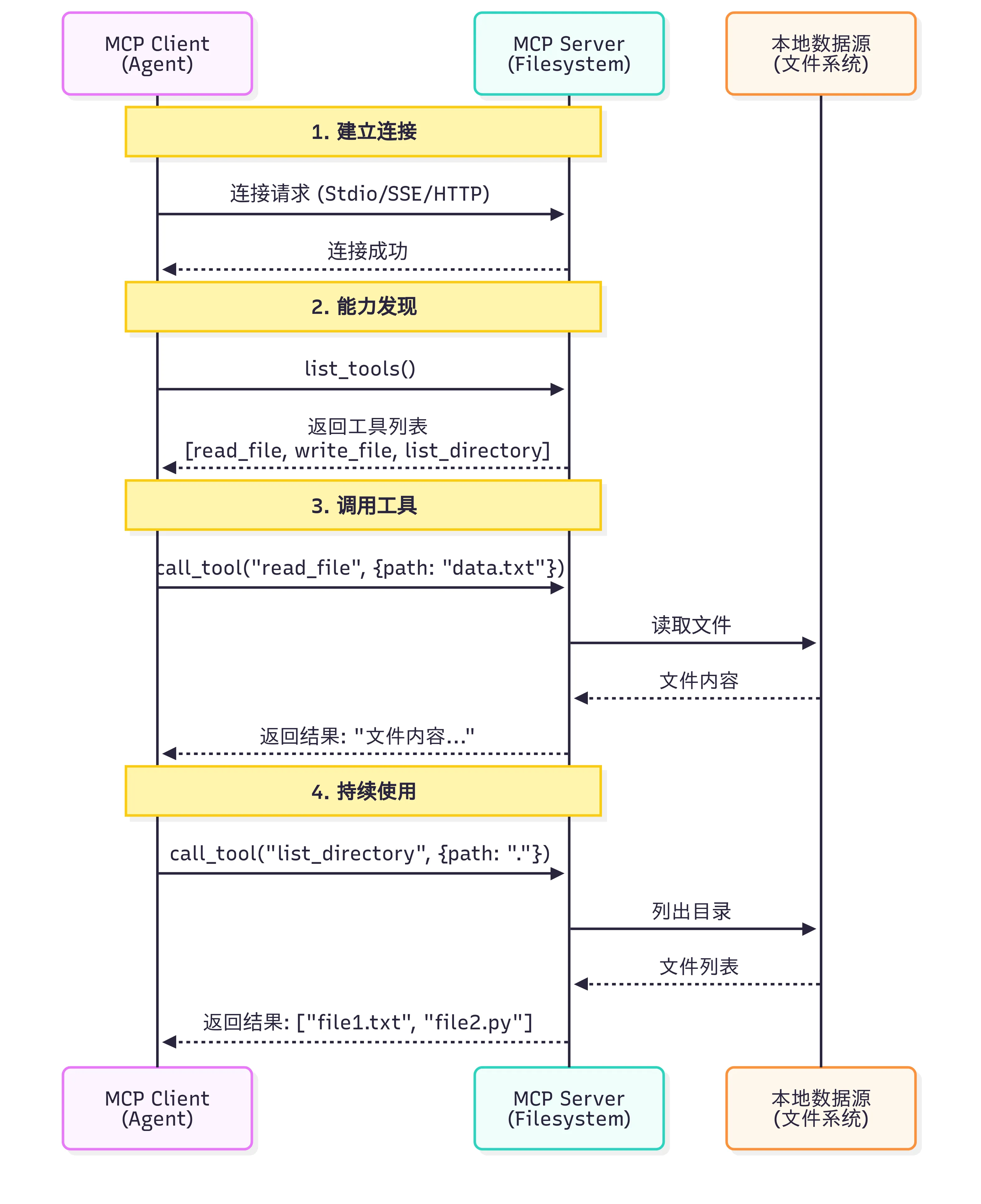
MCP的工作流程
Function Calling
- 概念: 大模型的一项核心能力,
- AI 不自己算,而是叫程序来算
MCP 和 Function calling 区别
| 维度 | Function Calling | MCP |
|---|---|---|
| 本质 | LLM 的一种能力 | 标准化的通信协议 |
| 作用层级 | 模型层 | 基础设施层 |
| 解决问题 | 让 LLM 知道“如何调用函数” | 让工具和模型“如何连接” |
| 标准化 | 每个模型提供商实现不同 | 统一的协议规范 |
| 工具复用 | 需要为每个应用重写 | 社区工具可直接使用 |
- 大白话总结
- function calling
- 需要自己取实现具体的应用方法
- 针对不同的模型,进行不同的实现
- mcp
- 用社区已有的mcp工具调用即可
- function calling
function calling 实现代码参考
js# 步骤1:为每个LLM提供商定义函数
# OpenAI格式
openai_tools = [
    {
        "type": "function",
        "function": {
            "name": "search_github",
            "description": "搜索GitHub仓库",
            "parameters": {
                "type": "object",
                "properties": {
                    "query": {"type": "string", "description": "搜索关键词"}
                },
                "required": ["query"]
            }
        }
    }
]

# Claude格式
claude_tools = [
    {
        "name": "search_github",
        "description": "搜索GitHub仓库",
        "input_schema": {  # 注意:不是parameters
            "type": "object",
            "properties": {
                "query": {"type": "string", "description": "搜索关键词"}
            },
            "required": ["query"]
        }
    }
]

# 步骤2:自己实现工具函数
def search_github(query):
    import requests
    response = requests.get(
        "https://api.github.com/search/repositories",
        params={"q": query}
    )
    return response.json()

# 步骤3:处理不同模型的响应格式
# OpenAI的响应
if response.choices[0].message.tool_calls:
    tool_call = response.choices[0].message.tool_calls[0]
    result = search_github(**json.loads(tool_call.function.arguments))

# Claude的响应
if response.content[0].type == "tool_use":
    tool_use = response.content[0]
    result = search_github(**tool_use.input)
mcp实现方式代码参考
jsfrom hello_agents.protocols import MCPClient

# 步骤1:连接到社区提供的MCP服务器(无需自己实现)
github_client = MCPClient([
    "npx", "-y", "@modelcontextprotocol/server-github"
])

fs_client = MCPClient([
    "npx", "-y", "@modelcontextprotocol/server-filesystem", "."
])

# 步骤2:统一的调用方式(与模型无关)
async with github_client:
    # 自动发现工具
    tools = await github_client.list_tools()

    # 调用工具(标准化接口)
    result = await github_client.call_tool(
        "search_repositories",
        {"query": "AI agents"}
    )

# 步骤3:任何支持MCP的模型都能使用
# OpenAI、Claude、Llama等都使用相同的MCP客户端
skill
- 对于小白来说,可以先理解为skill是大模型可以动态调用的工作流(区别n8n:n8n是一开始就定义好的workflow)
Chain 和Graph
- Graph(图) 和 Chain(链) 是组织 AI 逻辑的两大基石
- Chain:线性流水线,逻辑是单向、线性的。
- Graph:复杂的“思维导图” ,它允许节点之间有复杂的连接,甚至可以回退、循环、分支。
ReAct :目前最经典、最常用的 Agent 运行模式
- 思考-行动-观察结果
Plan-and-Execute (计划与执行)
- 先计划再执行
Reflection / Self-Correction (反思/自我纠错)
- 它包含两个部分:一个负责“做”,一个负责“评”。
- 逻辑:
- Generator (生成者):先出一个草稿。
- Reflector (评价者):检查草稿里的错误(如逻辑不通、事实错误、格式不对)。
- 循环:生成者根据评价意见修改,直到评价者满意。
多模态嵌入 (Multimodal Embedding)
- 其目的是将不同类型的数据(如图像和文本)映射到同一个共享的向量空间。在这个统一的空间里,一段描述“一只奔跑的狗”的文字,其向量会非常接近一张真实小狗奔跑的图片向量。
prompt工程、context工程、harness工程的区别
- prompt 工程解决的是让模型理解具体的任务诉求与输出格式
- context工程 解决的是解决长上下文下的幻觉、信息丢失与注意力分散
- harness工程 解决的是Agent 的稳定性、死循环、工具调用失败与闭环测试
本文作者:曹子昂
本文链接:
版权声明:本博客所有文章除特别声明外,均采用 BY-NC-SA 许可协议。转载请注明出处!